Surveyor Calculator2.3.6
Publisher Description
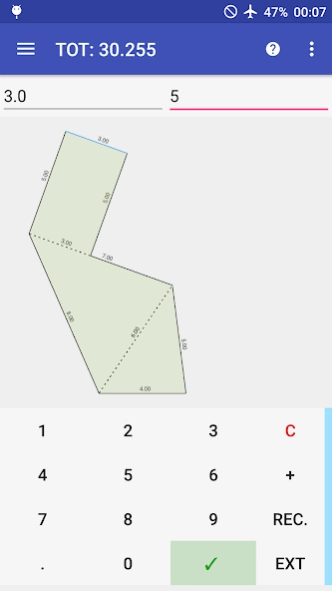
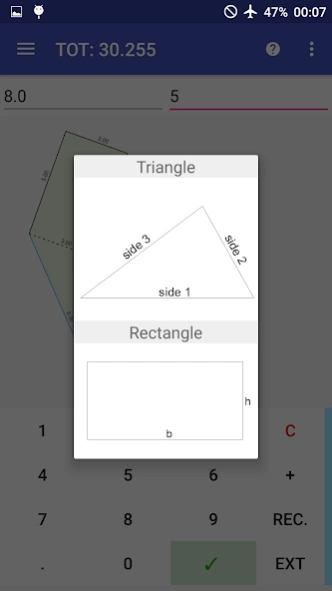

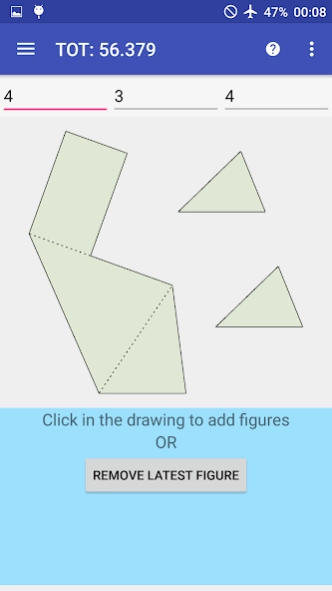
Surveyor Calculator is designed to perform speed and productivity in surveys.
Surveyor Calculator is an application designed to perform the max speed and productivity in the field of survey.
It allows to calculate areas of a survey but also to create automatically a digital figure of the survey to share or print in a PDF format.
Why this is a very useful app? This app is very useful because to do these things you need only a smartphone. You can:
- Triangle, trapezoid, isoscele triangle, rectangle and rectum triangle supported
- Add figures just writing its sides and tapping a side to link with
- Calculate immediatly area
- Add figure where you want in the X,Y space or in a specified distance from a point
- Add positive or negative figure internally or externally to another
- Pinch to zoom, double tap to fill the space
- Manage sides, quotes, areas
- Export in PDF with table (if you want) that contains partial and total areas
Tutorial: https://drive.google.com/file/d/0B6WwmXidoHmqNXZuMnR2eWpDdjg/view?usp=sharing
How it works?
Surveyor calc works like a simple calculator.
You have only to write the sides of a figure measured in your survey.
“+” can be changed to “-“ if you want to add “negative” triangles and “C” is a “del button”.
There are only two things to remember:
- You have to write the triangles sides in the counterclockwise sense;
- When adding a new figure, remember to tap a side where you want to link the new figure.
Facebook page: https://www.facebook.com/SurveyorCalc
About Surveyor Calculator
The company that develops Surveyor Calculator is B01 software. The latest version released by its developer is 2.3.6. This app was rated by 26 users of our site and has an average rating of 4.4.
To install Surveyor Calculator on your Android device, just click the green Continue To App button above to start the installation process. The app is listed on our website since 2021-03-23 and was downloaded 1,362 times. We have already checked if the download link is safe, however for your own protection we recommend that you scan the downloaded app with your antivirus. Your antivirus may detect the Surveyor Calculator as malware as malware if the download link to appinventor.ai_barcaroandrea.Surveyor_calc is broken.
How to install Surveyor Calculator on your Android device:
- Click on the Continue To App button on our website. This will redirect you to Google Play.
- Once the Surveyor Calculator is shown in the Google Play listing of your Android device, you can start its download and installation. Tap on the Install button located below the search bar and to the right of the app icon.
- A pop-up window with the permissions required by Surveyor Calculator will be shown. Click on Accept to continue the process.
- Surveyor Calculator will be downloaded onto your device, displaying a progress. Once the download completes, the installation will start and you'll get a notification after the installation is finished.
Program Details
System requirements
Download information
Pricing
Version History
version 2.3.6
posted on 2021-03-24
- Added progress message when exporting pdf or printing the survey
version 2.3.0
posted on 2020-12-06
- added a manual way to select a side inside drawing
- bufix: now can be used all the available space for the drawing
- general bufixes
version 2.2.3
posted on 2020-10-25
- added Dxf file export (premium users)
- bugfixes
version 2.1.9
posted on 2018-10-13
- Calculations PDF export (in-app purchase)
- Join sides tool
- Privacy policy link
version 2.1.7
posted on 2018-02-14
- Added CSV export
- Bugfixes
version 2.1.5
posted on 2017-11-22
- Bugfixes
version 2.0.7
posted on 2016-11-06
2.0.7:,✯ Bugfixes,2.0.6:,✯ Bugfixes,2.0.5:,✯ Quotes, areas and lines are now free,✯ Manage x and y distance for quotes,✯ Manage figures id,✯ Upgraded selection precision,✯ Bugfixes
